mercredi 29 juin 2016

OpenCv iOS camera preview single orientation only without stretching

I'm writing a OpenCv Cordova plugin for iOS. I needed the camera preview to be fullscreen and to maintain aspect ratio for all iOS devices (iPhone, iPads).

I was able to achieve Portrait mode (see code) and it works perfectly on iPhone 6/plus but the camera preview is stretched slightly on iPads possibly due to the fact that AVCaptureSessionPresetHigh's supported resolution is 1280x720. Anyone has any ideas on how to achieve single orientation (landscape or portrait only) and maintain aspect ratio?

My current code for starting a camera is

- (void)viewDidLoad {
    [super viewDidLoad];
    // Do any additional setup after loading the view.

    // Initialize imageView to fullscreen
    imageView = [[UIImageView alloc] initWithFrame:[UIScreen mainScreen].bounds];
    [self.view addSubview:imageView];
    [imageView setContentMode:UIViewContentModeScaleAspectFill];
    [imageView setClipsToBounds:YES];

    self.videoCamera = [[FixedCvVideoCamera alloc] initWithParentView:imageView];
    self.videoCamera.delegate = self;
    self.videoCamera.defaultAVCaptureDevicePosition = AVCaptureDevicePositionBack;
    self.videoCamera.defaultAVCaptureSessionPreset = AVCaptureSessionPresetHigh;
    self.videoCamera.defaultAVCaptureVideoOrientation =  AVCaptureVideoOrientationPortrait;
    self.videoCamera.defaultFPS = 30;
    [self.videoCamera start];
}

Notice I'm using FixedCvVideoCamera instead of the OpenCv CvVideoCamera class. The reason is that I'm subclassing and overriding CvVideoCamera's layoutPreviewLayer function to keep portrait mode.

 - (void)layoutPreviewLayer;
{
    if (self.parentView != nil)
    {
        CALayer* layer = self->customPreviewLayer;
        CGRect bounds = self->customPreviewLayer.bounds;
        int rotation_angle = 0;

        switch (defaultAVCaptureVideoOrientation) {
            case AVCaptureVideoOrientationLandscapeRight:
                rotation_angle = 270;
                break;
            case AVCaptureVideoOrientationPortraitUpsideDown:
                rotation_angle = 180;
                break;
            case AVCaptureVideoOrientationLandscapeLeft:
                rotation_angle = 90;
                break;
            case AVCaptureVideoOrientationPortrait:
            default:
                break;
        }

        layer.position = CGPointMake(self.parentView.frame.size.width/2., self.parentView.frame.size.height/2.);
        layer.affineTransform = CGAffineTransformMakeRotation( DEGREES_RADIANS(rotation_angle) );
        layer.bounds = bounds;
    }
}

Thanks in advance.

Opaque pointer to struct with template members

Suppose I'm building a linked list (the real data structure is completely different, but a linked list suffices for the question) whose nodes look like

template <typename T>
struct node
{
  struct node<T> *next;
  T data;
};

For my data structure, I have a lot of functions with return type struct node *, and I want the user to treat this type as opaque. In the linked list example, such a function could be for example get_next(struct node<T> *n) or insert_after(struct node<T> *x, struct node<T> *y). Only very few functions, namely those that allocate nodes or get/set their data field, need to know anything about T.

Is there a nicer way to "ignore T" and let the user interact only with something like a typedef struct node * opaque_handle for those functions that don't ever have to care about T? My gut reaction, coming from C, is just to cast to and from void*, but that doesn't sound very elegant.

Edit: CygnusX1's comment has convinced me that I'm asking for too many guarantees from the type system at the same time that I'm trying to circumvent too many of those guarantees. I will fall back to letting T be void * at the cost of casting and indirection.

Access Violation Error when creating an std::string from a unique_ptr char buffer

I'm currently trying to read a null-terminated ASCII string from another process. To do so, I created a class which acts as a memory reader with a generic readBytes function which acts as a wrapper for the Windows function ReadProcessMemory with error handling. My readBytes function works just fine, however my readAsciiString function (code below) is throwing Access Violation Errors when creating a new std::string from a unique_ptr char array.

std::string ProcessReader::readAsciiString(DWORD_PTR offset, int maxChars)
{
    auto buffer = std::make_unique<char[]>(maxChars);

    if (readBytes(offset, buffer.get(), maxChars))
    {
        int pos = 0;
        for (; pos < maxChars; pos++)
        {
            if (buffer[pos] == '�')
                break;
        }

        auto returnBuffer = std::make_unique<char[]>(pos);
        memcpy(returnBuffer.get(), buffer.get(), pos);

        // The program breaks here reporting an Access Violation
        // trying to writing to offset 0x00000000FFFFFFFF
        return std::string(returnBuffer.get());
    }

    return std::string("");
}

Here is a screenshot of the code in Visual Studio with a breakpoint on the return line while watching both buffer and returnBuffer. Resuming the program causes it to crash on that very line.

Screenshot in Visual Studio

I'm relatively new to C++ and am struggling to see what I'm doing wrong. Am I approaching this the wrong way?

Trying to create an iOS WKWebView with a size smaller than the screen programmatically

Im starting with a simple app that just shows a web view using WKWebView. Everything builds, and works okay, except that it is always fullscreen. Ideally it would not extend under the iOS status bar at the top. It needs to be lowered by 20px to be below it. I have searched extensively for a solution but nothing changes the size. Nothing is setup in InterfaceBuilder, I'm doing everything programmatically. Using Swift.

This seems like something basic that many apps with a WKWebView would do. It should be simple. I'm probably missing something obvious. Any help is appreciated. Thanks in advance.

This is what I have so far:

import UIKit
import WebKit
class ViewController: UIViewController, UIGestureRecognizerDelegate , UIWebViewDelegate, WKNavigationDelegate  {

    let url = NSURL(string:"http://stackoverflow.com")
    var webView: WKWebView!

    override func viewDidLoad() {
        super.viewDidLoad()
        webView = WKWebView(frame: CGRect( x: 0, y: 20, width: 380, height: 150 ), configuration: WKWebViewConfiguration() )
        self.view = webView
        self.view.frame = webView.frame
        let req = NSURLRequest(URL:url!)
        webView.loadRequest(req)
        self.webView.allowsBackForwardNavigationGestures = true
    }

    override func didReceiveMemoryWarning() {
        super.didReceiveMemoryWarning()
        // Dispose of any resources that can be recreated.
    }
}

Many thanks Emilio!! The adjusted code works perfectly!

import UIKit
import WebKit
class ViewController: UIViewController, UIGestureRecognizerDelegate , UIWebViewDelegate, WKNavigationDelegate  {

    let url = NSURL(string:"http://stackoverflow.com")
    var webView: WKWebView!

    override func viewDidLoad() {
        super.viewDidLoad()
        webView = WKWebView(frame: CGRect( x: 0, y: 20, width: self.view.frame.width, height: self.view.frame.height - 20 ), configuration: WKWebViewConfiguration() )
        self.view.addSubview(webView)
         let req = NSURLRequest(URL:url!)
        webView.loadRequest(req)
        self.webView.allowsBackForwardNavigationGestures = true
    }

    override func didReceiveMemoryWarning() {
        super.didReceiveMemoryWarning()
        // Dispose of any resources that can be recreated.
    }
}

GMSMapView does not occupy full bounds

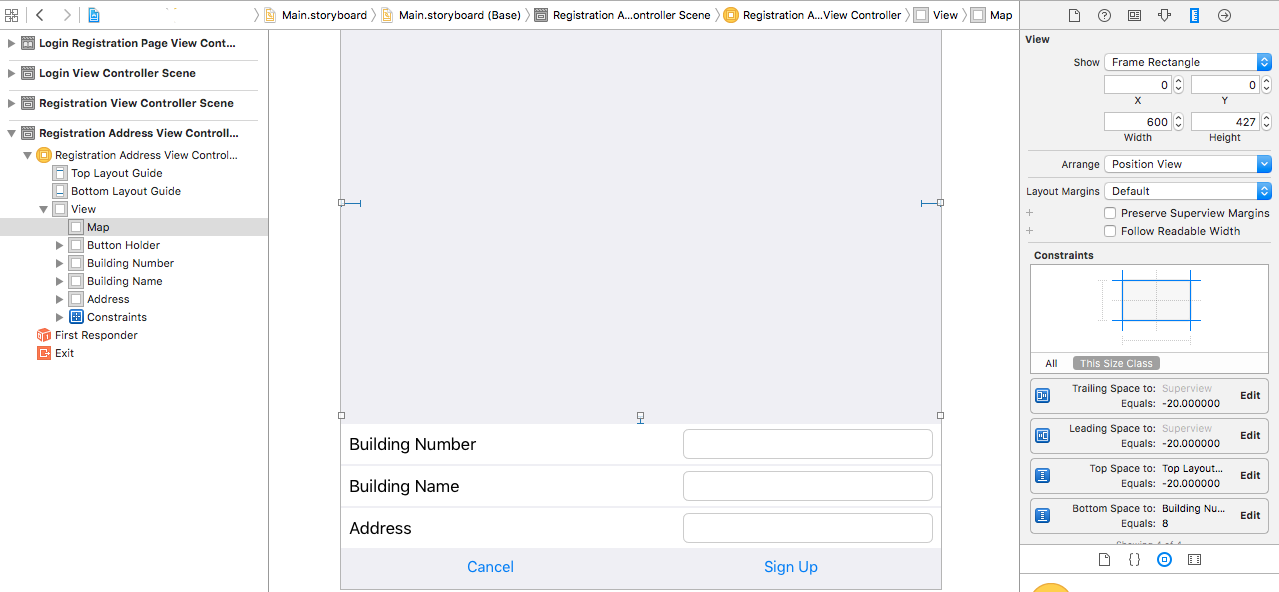
I've designed the following layout on XCode:

enter image description here

The button Layout (Cancel, Sign Up) is pinned to the bottom layout guide. On top of that are 3 equally sized UIViews, each with 1px vertical spacing in between them.

The remaining space is occupied by mapView, which is a UIView. It is pinned to the top, leading and trailing layout guide. It also has 8px spacing between the building number view.

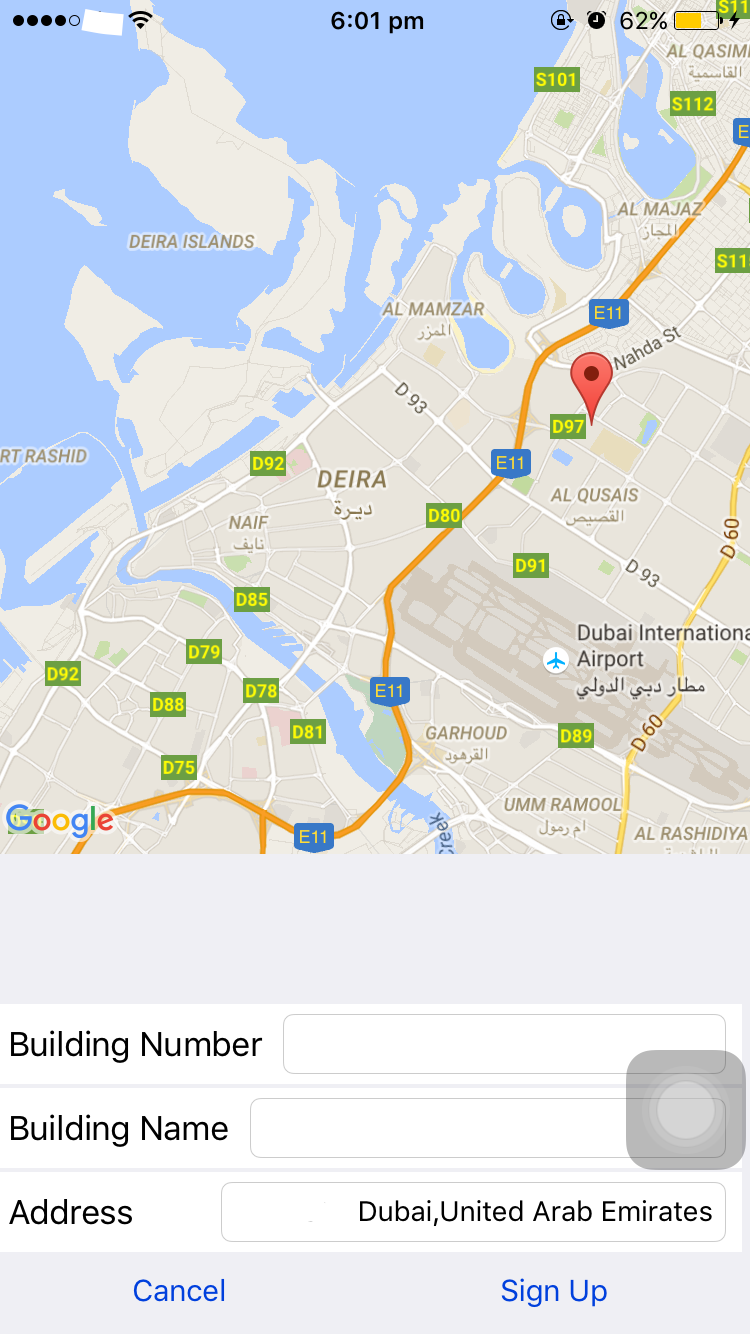
When I run the application on my iPhone 6, I get this:

enter image description here

The map is not drawn in all available space. I don't know why:

When setting up the map, I do pass the bounds of the mapView:

class RegisterAddressViewController: BaseViewController, CLLocationManagerDelegate, GMSMapViewDelegate {

    @IBOutlet var mapView : UIView!

    override func viewWillAppear(animated: Bool) {
        super.viewWillAppear(animated)
        self.setupMapView()
        self.setupLocationManager()
    }

    func setupMapView(){
        let camera = GMSCameraPosition.cameraWithLatitude(-33.86,
                                                          longitude: 151.20, zoom: 6)
        self.gmsMapView = GMSMapView.mapWithFrame(self.mapView.bounds, camera: camera)
        self.gmsMapView!.delegate = self
        self.mapView.addSubview(self.gmsMapView!)
    }

    //...
}

I do not believe it's an AutoLayout issue since no warning appears in the console and the light grey background of the mapView indicates that the layout is set correctly.

Is there some configuration that I'm missing? Thanks.

mardi 28 juin 2016

Different values from C++ and JAVA using same code

I am translating an android image processing app to ndk. I'm facing the following problem: by logging the some value processed with java/android and others from C++/ndk, I got different values!!

I share with you the java and C++ codes:

Java:

double[] img2 = new double[w*h];
        y1 = new double[w];
        y2 = new double[w];
        for (int j = 0; j < h; j++) {
            for (int n = 2; n < w; ++n) {

                y1[n] = k1 * (img1[j*w+n] + exp(-alpha) * (alpha - 1) * img1[n-1+j*w]) ;

            }

            for(int n = w -3; n>=0; n--){

                y2[n] = k1 *(exp(-alpha)*(alpha+1)*img1[n+1+j*w] - exp(-2*alpha)*img1[n+2+j*w]);
            }

            for (int i = 0; i < w; i++) {
                img2[i+j*w] = y1[i] + y2[i];
            }


        }
        System.out.println("$$$$$$$$$$$$$$$$$$$$$$$$$$$$$$$$$$$$$$$$$$ java "+ (int)img2[w/2*h+h/2]);

C++:

double *y1 = new double[w];
    double *y2 = new double[w];
    double *img2 = new double[w * h];
    for (int j = 0; j < h; j++) {
                for (int n = 2; n < w; ++n) {

                    y1[n] = k1 * (img1[j*w+n] + exp(-alpha) * (alpha - 1) * img1[n-1+j*w]);

                }

                for(int n = w -3; n>=0; n--){

                    y2[n] = k1 *(exp(-alpha)*(alpha+1)*img1[n+1+j*w] - exp(-2*alpha)*img1[n+2+j*w]);
                }

                for (int i = 0; i < w; i++) {
                    img2[i+j*w] = y1[i] + y2[i];
                }


            }
    LOGI("$$$$$$$$$$$$$$$$$$$$$$$$$$$$$$$$$$$$$$$$$$ native %d", (int)img2[w/2*h+h/2]);

The output is:

$$$$$$$$$$$$$$$$$$$$$$$$$$$$$$$$$$$$$$$$$$ native -2147483648
$$$$$$$$$$$$$$$$$$$$$$$$$$$$$$$$$$$$$$$$$$ java 13502399

Knowing that I checked that the inputs on both sides(logs gives same values).

Forward touches to a UIScrollView

I have two view controllers. View controller A has a UIScrollView and presents view controller B. The presentation is interactive and controlled by the scrollView.contentOffset.

I want to integrate an interactive dismiss transition: When panning up, ViewController B should be dismissed interactively. The interactive dismiss transition should also control the ViewController A scrollView.

My first attempt was using a UIPanGestureRecognizer and setting the scrollView.contentOffset according to the panned distance. This works, however when the pan gesture is ended, the scrollView offset has to be animated to the end position. Using -[UIScrollView setContentOffset:animated: is not a good solution since it uses a linear animation, doesn't take the current pan velocity into account and doesn't decelerate nicely.

So I thought it should be possible to feed the touch events from my pan gesture recognizer into the scroll view. This should give us all the nice scroll view animation behavior.

I tried overriding the -touchesBegan/Moved/Ended/Cancelled withEvent: methods in my UIPanGestureRecognizer subclass like this:

- (void)touchesBegan:(NSSet *)touches withEvent:(UIEvent *)event {
    [scrollView touchesBegan:touches withEvent:event];
    [scrollView.panGestureRecognizer touchesBegan:touches withEvent:event];

    [super touchesBegan:touches withEvent:event];
}

But apparently something is blocking the scroll view from entering tracking mode. (It does go to dragging = YES but that's about it.) I verified the scrollView is userInteractionEnabled, not hidden and added to the view hierarchy.

So how can I forward my touch events to UIScrollView?